An awesome YouTube channel I follow called Country Boy Computers emailed me a couple weeks back giving me the heads up that my previous article in getting Intel Arc cards to work with vLLM ] didn't work for the Intel Arc Alchemist cards.
The specific offending card is the Arc A770. Released in 2022, it's been almost 4 years and surely, there must some great LLM support for it by now, right?
This was my assumption when I wrote the xpu inferencing article. I should've made the disclaimer that it was purely assumption when I had claimed that the configuration would work for Alchemist too. I am very sorry for any struggle on anyone's side coming from that. At the time, the A770 was sitting in my closet.
I've since pulled out the card to test as Country Boy Computers needed some help in getting inference working on this specific card. Spoiler alert, it still didn't turn out well, but we can gather some learning from the experience.
Alright, enough with the background story, let's dive into making the Arc A770 work with vLLM.
Reference System
I am not going to make the same mistake this time. Now that the other system with the AMD Ryzen 9 9900X and Arc B580 has been handed over to my wife, I no longer have access to this system. So, for this experiment I will use my current system,
All you will need to know to get a gauge in performance is the CPU, RAM and GPU. Here are the specs:
- Intel Core i7 13700 (Non-K, 8P/8E)
- 32 GB DDR5-6000 RAM (Crucial Pro)
- 16 GB Intel Arc A770
I am going to be pretty firm on the requirements now. Getting the A770 to comply was horribly tricky and I don't want to be loose with the environment setup. Your own system must be using:
- Ubuntu 24.04.3 LTS
- Python 3.12
Python 3.12 is non-negotiable. A lot of the dependencies that we will be pulling down will rely on having this specific version of Python. Use pyenv to switch your Python version if you have something older/newer.
Environment Setup
Get your system setup.
- Update your OS
sudo apt update && sudo apt dist-upgrade -y && sudo snap refresh
sudo reboot- Install all development dependencies
sudo apt install build-essential \
	make \
	cmake \
	git \
	git-lfs \
	curl \
	xz-utils \
	libbz2-dev \
	libncurses-dev \
	libreadline-dev \
	libsqlite3-dev \
	libssl-dev \
	xz-utils \
	tk-dev \
	libffi-dev \
	liblzma-dev \
	libcurl4-openssl-dev \
	zlib1g-dev \
	ninja-build \
	pkg-config \
	python3-dev \
	python3-venv \
	libnuma-dev \
	libze1 \
libze-dev -y- Install the Intel compute stack drivers. This is the same as how you would for the Battlemage cards. Here is the copy and paste version of what you'll have to do
# Add repository
sudo apt update
sudo apt install -y software-properties-common
sudo add-apt-repository -y ppa:kobuk-team/intel-graphics
sudo apt update

# Install compute stack drivers
sudo apt install -y libze-intel-gpu1 libze1 intel-opencl-icd clinfo intel-gsc

# Add the user to the render group
sudo gpasswd -a ${USER} render
newgrp render- Install oneAPI Base Toolkit
sudo apt update
sudo apt install -y gnupg wget

# download the key to system keyring
wget -O- https://apt.repos.intel.com/intel-gpg-keys/GPG-PUB-KEY-INTEL-SW-PRODUCTS.PUB \
| gpg --dearmor | sudo tee /usr/share/keyrings/oneapi-archive-keyring.gpg > /dev/null

# add signed entry to apt sources and configure the APT client to use Intel repository:
echo "deb [signed-by=/usr/share/keyrings/oneapi-archive-keyring.gpg] https://apt.repos.intel.com/oneapi all main" | sudo tee /etc/apt/sources.list.d/oneAPI.list

# update sources again
sudo apt update

# FINALLY Install the oneapi base toolkit
sudo apt install intel-oneapi-base-toolkit- For good measure, REBOOT!
sudo reboot
Verification
At this point, we need to verify that at least the A770s are ready to go. If you can't get the GPU drivers installed correctly, then there is no point in working through the rest of this article.
Run these commands:
clinfo | grep "Device Name"
ls -la /dev/dri/renderD*
groups | grep render
Then your ideal output should list out the A770s:
rngo@roger-lab:~$ clinfo | grep "Device Name"
ls -la /dev/dri/renderD*
groups | grep render
  Device Name                                     Intel(R) Arc(TM) A770 Graphics
    Device Name                                   Intel(R) Arc(TM) A770 Graphics
    Device Name                                   Intel(R) Arc(TM) A770 Graphics
    Device Name                                   Intel(R) Arc(TM) A770 Graphics
crw-rw----+ 1 root render 226, 128 Feb 12 15:44 /dev/dri/renderD128
render adm cdrom sudo dip plugdev users lpadmin rngo
If you see these GPUs being recognized, then you're set for the most confusing part of the process. Getting vLLM to work with the Arc A770s.
Virtual Environment
Perform the standard virtual environment practices. Create a separate directory so that it is easy to just blow away later if you need to. Get pip up to date too...
mkdir -p $HOME/vllm-xpu
cd $HOME/vllm-xpu

python3 -m venv .venv
source $HOME/vllm-xpu/.venv/bin/activate

pip install -U pip
vLLM
Alright, here is the most frustrating part. It drove me nuts for a couple of days, but I've simplified it as much as possible, so you don't have to go through the same pain.
The begin, vLLM after 0.9.1 is BROKEN for the Arc A770. This is the source of a lot of struggle.. After vLLM 0.10.0, the attention backend for the Intel GPUs was switched and now vLLM requires that an Intel card must have Xe2 cores (Battlemage) in order for some of the kernels (seems to be related to attention) to execute.
This sucks because the A770s are Alchemist architecture. They are using Xe cores. Unless you want to go and port over support for Xe cores in more recent versions of vLLM, we can't do too much about it.
But what we can do is just go use 0.9.1.
The disadvantage is that we will not be able to run some of the more recent models. This is a tricky tradeoff. I personally think it is a small trade-off. The card has 16 GB of VRAM and most interesting models nowadays are larger MoEs. I am not intentionally being negative -- just speaking the truth.
Clone vLLM and checkout v0.9.1.
git clone https://github.com/vllm-project/vllm.git
cd vllm
git checkout v0.9.1
Then install the dependencies:
pip install -U pip setuptools wheel
pip install -v -r requirements/xpu.txt
At this point, you'll need to do some terminal-wizardry to actually install vLLM correctly.
The most important thing to know is that transformers<4.54.0 is required. pip will indiscriminately use the latest version of the transformers library. Watch out for that.
You can use the handy xpu-run script to install the dependency. If you don't have that script, go back to the previous article, grab it and ensure it is executable in your $PATH variable.
xpu-run pip install -U --force-reinstall "transformers<4.54.0"
We'll need to now officially install vLLM 0.9.1 as an editable module. Yeah, it's different from how we did it before. Make sure VLLM_TARGET_DEVICE environment variable is set to xpu.
VLLM_TARGET_DEVICE=xpu xpu-run python -m pip install -v -e . --no-deps --no-build-isolation
Additional Dependencies: libfabric
This part is CRITICAL. Apparently we're missing some important dependencies with distributed inference.
This was the main pain. WIthout libfabric, vLLM will complain about missing dependencies for distributed inference. Even though we're using one GPU, this is still necessary. Just do it anyway:
sudo apt install -y libfabric1 libfabric-dev
Model
Which model to use? Unfortunately, the Arc A770 is pretty old and unoptimized as of 2026..
On paper, it looks like good hardware. It has 16 GB of GDDR6 with a 192 bit bus -- which gives it about 560 GB/s effective memory bandwidth. In reality, it is slow when it comes to raw compute for inference.
I am pretty certain there is a lot on the table that can be tapped. Unfortunately, I think at this point, Intel doesn't care about Alchemist anymore and it seems like the community doesn't have much interest in it either.
We'll work with what we have.
In the previous post, we used Qwen3-4B-Thinking-2507. This model was unquantized running at its full FP16 precision. I won't even bother with that here. To be transparent, the generation speed (tk/s) for this specific card on that specific model is: 15 tk/s on my system. It is disappointing as the card itself can draw up to 190W of power. I would be more forgiving if I was getting 15 tk/s on a lower power GPU like <75W. That is not the case.
Luckily, we can run quantized models in vLLM, The Qwen3-4B-Thinking-2507 model also has a AWQ version. The accuracy and quality loss in these models are pretty much next to none at 4-bit. I don't notice anything, but if if you force me to just state some number I'd probably say maybe about 1% accuracy loss, so it is not significant.
Qwen3-4B-AWQ
Get the Qwen3-4B-AWQ model directly from the HuggingFace Qwen repo. Its the same 4B thinking model, but quantized to INT4 in a very smart way.
You're going to be fine with this model. 😊
cd $HOME/models

git clone https://huggingface.co/Qwen/Qwen3-4B-AWQ
Finally create a helper script to run the model:
#!/bin/bash

CCL_ATL_TRANSPORT=ofi
CCL_ATL_SHM=1
CCL_ZER_IPC_EXCHANGE=sockets
FI_PROVIDER=shm
SYCL_PI_LEVEL_ZERO_USE_IMMEDIATE_COMMANDLISTS=1
USE_XETLA=OFF
SYCL_CACHE_PERSISTENT=1

xpu-run vllm serve "$HOME/models/Qwen3-4B-AWQ" \
	--host 0.0.0.0 \
	--port 8000 \
	--dtype float16 \
	--served-model-name Qwen3-4B-AWQ \
	--max-model-len 8192 \
	--tensor-parallel-size 1 \
	--pipeline-parallel-size 1 \
	--gpu-memory-utilization 0.85 \
	--disable-async-output-proc \
	--enforce-eager
Aaand now, let's run it!!!
./run-qwen3-4b-awq.shUsing the same prompt:
Is it possible for a US Revolutionary War soldier or a child of one to have lived to see the 1900s? Consider that grand-children and onwards do not count.The result we get is 21.7 tk/s for generating 3125 tokens. I don't think it is extremely slow, but I am disappointed.

Llama.cpp
What's it like for llama.cpp? For llama.cpp, we aren't that much faster either, with about 23 tk/s. I'd just say this is margin of error.

vLLM vs Llama.cpp
Well, if llama.cpp is already at or even faster than vLLM with token generation using the A770, what's the point?
What I have just shown you is the single user scenario. The key in deciding whether to use vLLM or llama.cpp comes to throughput.
In a multi-user or even multi-agent scenario (think: Deep Research), llama.cpp is generally less optimized. You'll experience this if you set -np 4 and try to do 4 requests in parallel. You'll notice some key things:
- The entire context length is divided by 4. Our current 8,192 tokens is now 2,048 tokens per session. This can lead to unexpected truncation.
- Token generation is generally, overall slower.
Here is the demonstration and result of that:
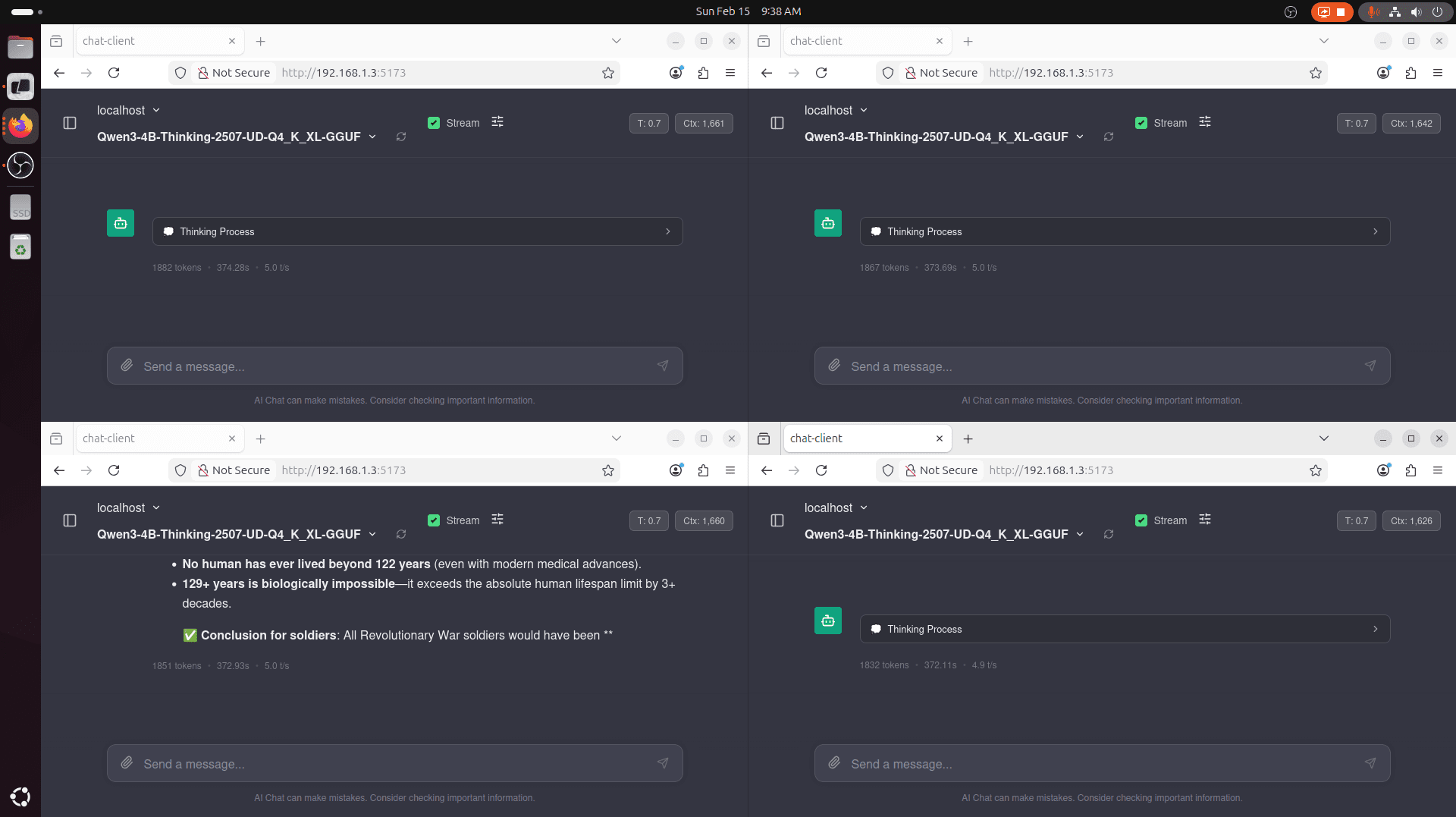
Notice how only one of the requests actually finished. Context window was filled for the rest of 'em. We also see that llama.cpp slows to a 5.0 tk/s generation speed. At this speed, my eyes are now reading much faster than tokens being generated...
With vLLM, we can possibly do better. We have our entire context for each request, leading to completion of the query. But we also have faster token generation speed. This is because vLLM is much better when it comes to batching requests and concurrency. This results in much higher throughput.
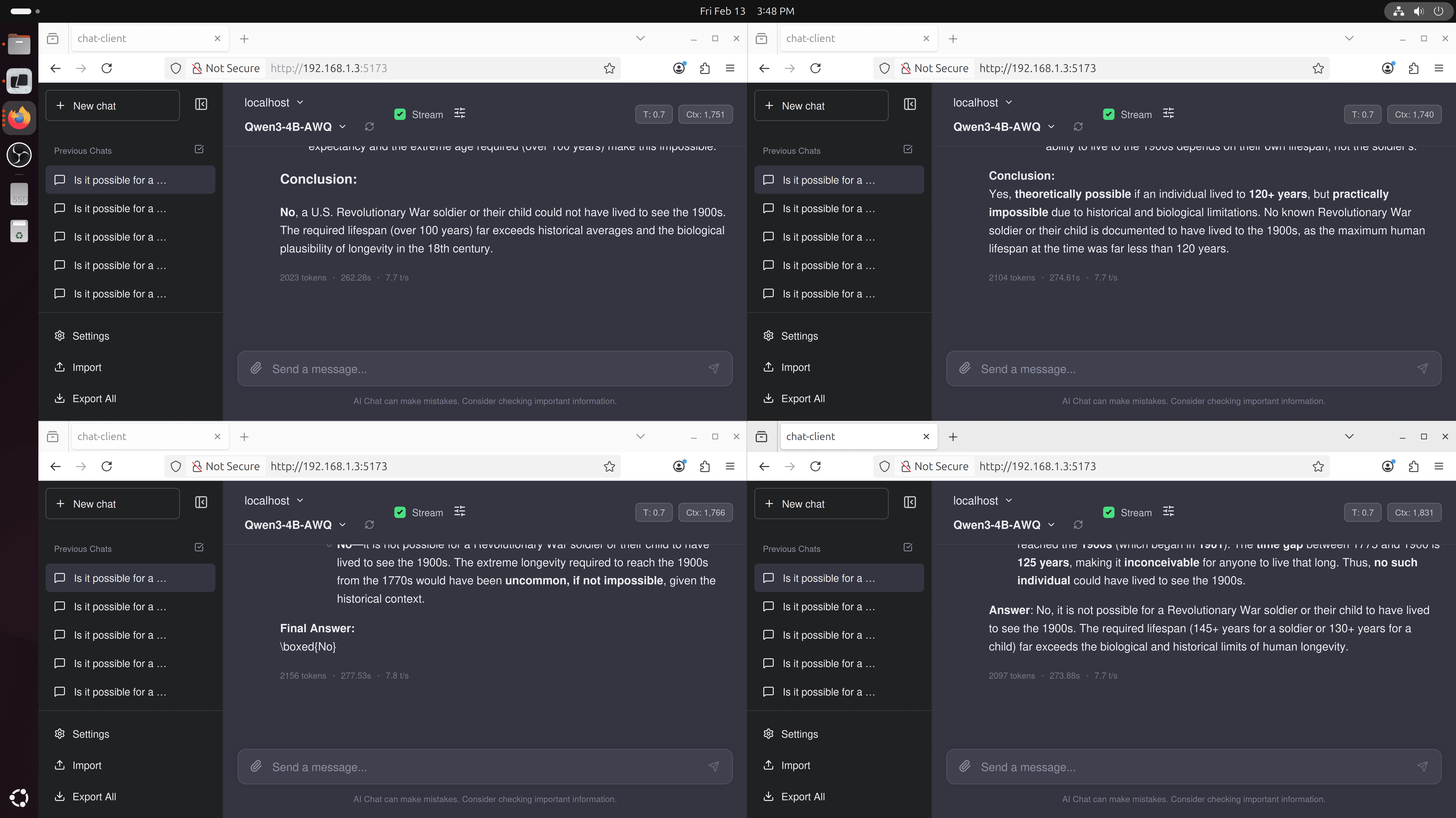
Summary of Results
To summarize this, in a single request, single user, single agent scenario, pick whatever -- llama.cpp with vulkan or vLLM with xpu will give you similar performance characteristics for token generation.
| (#) of Reqs | Engine | Tk/s |
| 1 | vLLM | 21.7 |
| 1 | llama.cpp | 21.0 |
Things change when you want lots of throughput for concurrent requests. This is useful for multi-user or multi-agent scenarios. For our Arc A770, it is really hard to tell, but as the number of requests scales, vLLM begins to pull away from llama.cpp.
| (#) of Reqs | Engine | Tk/s |
| 4 | vLLM | 7.9 tk/s |
| 4 | llama.cpp | 7.5 tk/s |
| 6 | llama.cpp | 4.8 tk/s |
| 6 | vLLM | 6.7 tk/s |
Is this all even worth it? Is the A770 worth buying at a low price for low cost inference?
No. I'd stay away at this point. The power draw at 190W for the token generation and support puts it at such a huge disadvantage compared to modern budget cards. A 12 GB B580 is much better, or even an AMD Radeon 890M in a mini PC will be more fun to play with. :)